Loop engineering for generative UI: an agent that renders and verifies native screens

An agent loop that doesn't just write code, it renders a native screen and checks it against the schema before it counts.
An agent can write the code for a screen. Whether that screen renders the right thing on an actual phone is a different question, and generative UI is exactly where that gap shows up. The model emits something plausible, it renders to an empty view or the wrong component, and you only find out by looking. Closing that gap is what a loop is for.
Loop engineering has been the phrase in every other AI newsletter this month. Here is what it means when the agent's output is a live native screen, not just a file.
Where the term comes from
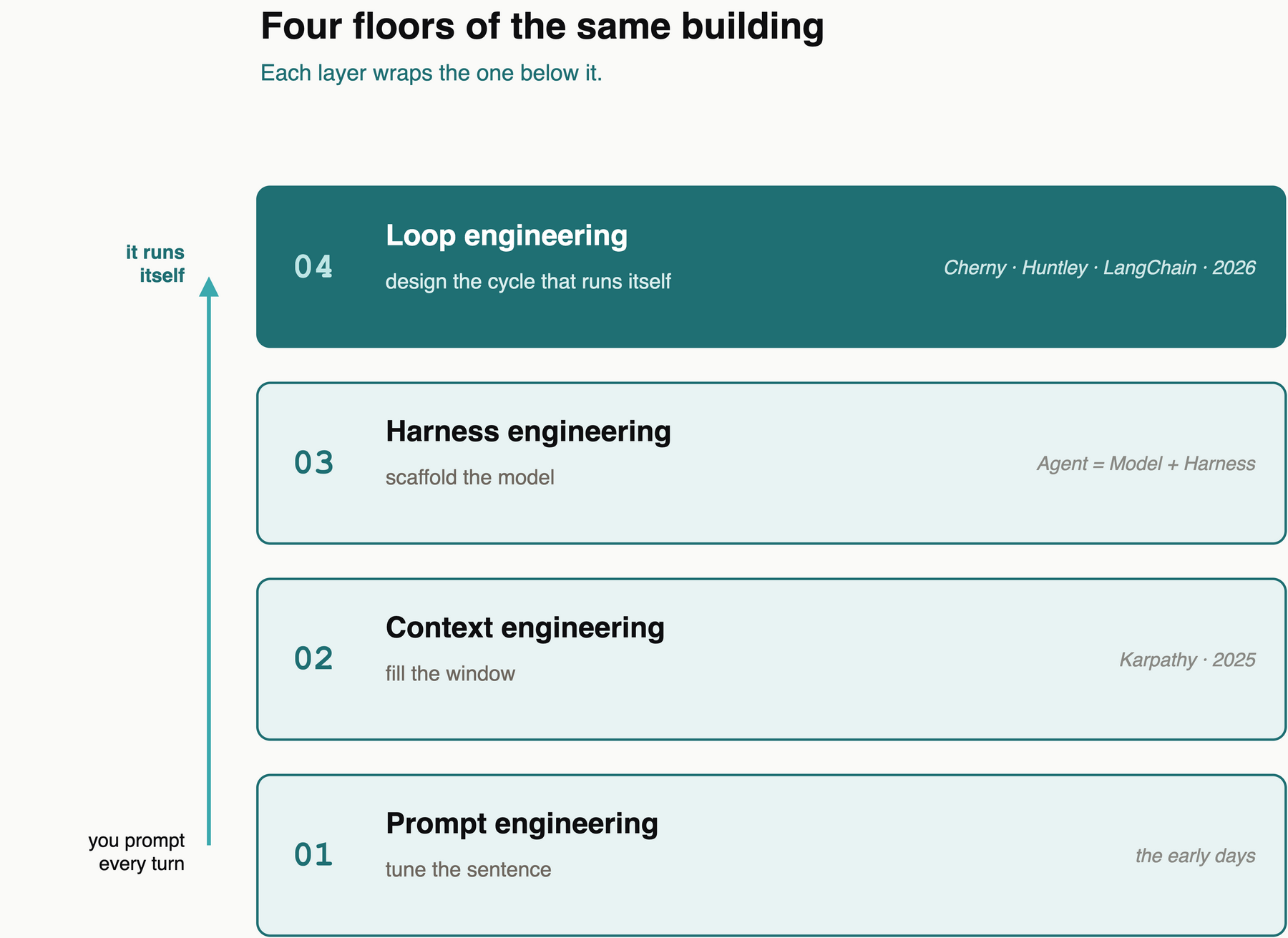
The lineage is short. Andrej Karpathy made the case for "context engineering" over "prompt engineering," because the real work is filling the context window with the right things for the next step. Then the agent crowd pushed it a floor higher. Boris Cherny, who built Claude Code at Anthropic, says he doesn't prompt Claude anymore, he runs loops that prompt Claude and figure out what to do. Geoffrey Huntley runs a coding agent inside a plain while loop he calls Ralph. Same shape everywhere: stop prompting the agent every turn, build the thing that prompts it for you.
The four parts of a loop
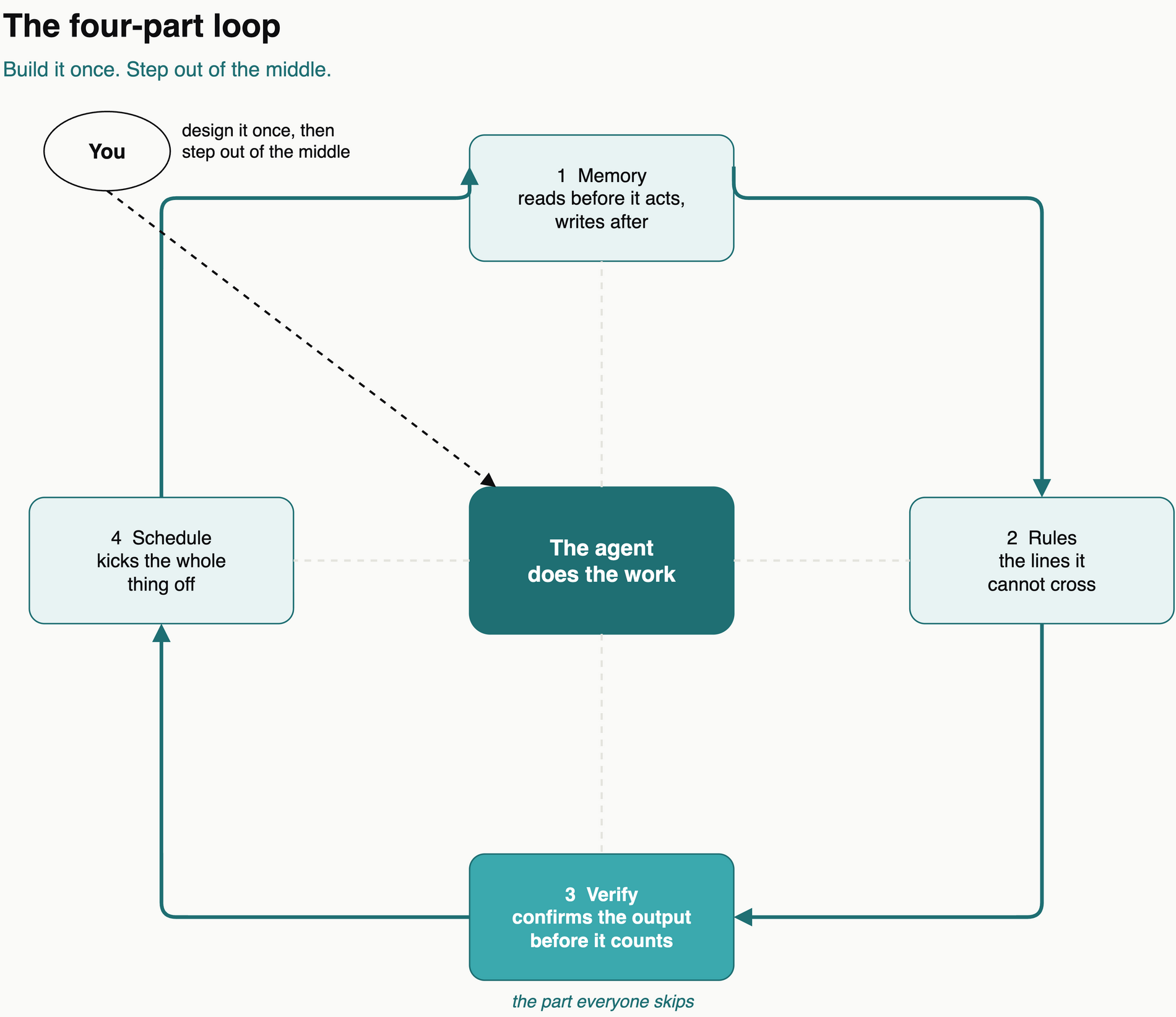
A loop is the thing that runs your work without you re-prompting it each time. It has four parts.
A memory it reads before it acts and writes to after. A set of rules it cannot cross. A verifier that confirms the output before it counts. A schedule that kicks the whole thing off. Memory, rules, verify, schedule. You wire them once, then you step out of the middle.
A worked example: a loop that builds a screen, not a file
Here is the loop running on a generative-UI task, an agent producing an onboarding screen from a goal. The twist: the output is a rendered native screen, so the verifier checks the screen, not the source.
The goal, written as checkboxes before anything runs:
/goal Generate the "Goals" onboarding step.
End-state (true/false checkable):
- [ ] the agent emits a UI schema Wire can render
- [ ] every component in the schema exists in the Wire registry
- [ ] the rendered tree contains the required fields (a prompt + a multi-select)
- [ ] it renders on iOS and Android with no fallback nodes
Run 1. The agent emits a schema and reports a finished screen. The verifier renders it through Wire and inspects the result instead of trusting the description:
RESULT: FAIL
FAILED_CHECK: schema uses "ChipGroup", not in the Wire registry -> rendered as an empty fallback node
The agent invented a component that does not exist. The code looked fine. The screen was half-empty. On a normal generative-UI pass that ships to a user; the verifier caught it by looking at the rendered tree.
The ratchet. The failure becomes a rule the next run cannot break:
- Only emit components in the Wire registry. A multi-select is "SelectList", never "ChipGroup".
Run 2. Agent emits a valid schema, Wire renders it, the verifier confirms every required field is present and nothing fell back. Pass. Two runs, nobody in the middle, and a half-rendered screen never reached anyone.
The part everyone skips
The verifier is the one people leave out, and it's the one that matters most. Memory plus rules plus schedule gives you an agent that produces a lot of screens. It doesn't give you screens you can trust to ship unseen. Skip the verify step and you don't have a loop, you have a very confident intern with a cron job.
Generative UI raises the stakes, because the failure is invisible in the code and only obvious on the device. The verifier is what moves that check from your eyes to the loop.
What makes the verify step possible here
A loop that verifies a screen needs something that can turn the agent's output into a real screen and report back what actually rendered. That is what Wire RN does: it takes an agent's UI schema and renders it natively, and it gives the verifier a concrete thing to check, the rendered tree against the schema, components against the registry. Without that, "verify the UI" is just you, squinting at a simulator. With it, the loop closes.
One warning before you wire one
The loop doesn't know what you're using it for. Two people build the identical setup and get opposite results. One uses it to move faster on work they understand deeply. The other uses it to avoid understanding the work at all. Build the loop like someone who intends to stay the engineer, not just the one who presses go.
*First published on Code Meet AI, where i write about building with AI, receipts included.*